1. Download ICQ Client
Supported ICQ Versions on this Server:
Choose and install one of the supported classic ICQ clients below:
- ICQ 5.1 / ICQ 5 / ICQ 4 / ICQ 2003b (Recommended — OSCAR TCP Port
5190) - ICQ 2001b / ICQ 2002a (OSCAR TCP Port
5190) - ICQ 2000b (OSCAR TCP Port
5190) - ICQ 98a / ICQ 99a / ICQ 99b (Legacy UDP Port
4000)
Download links will appear here shortly.
2. How to Connect (ICQ 2003b, ICQ 4 & ICQ 5.1)
Step-by-Step Configuration Guide:
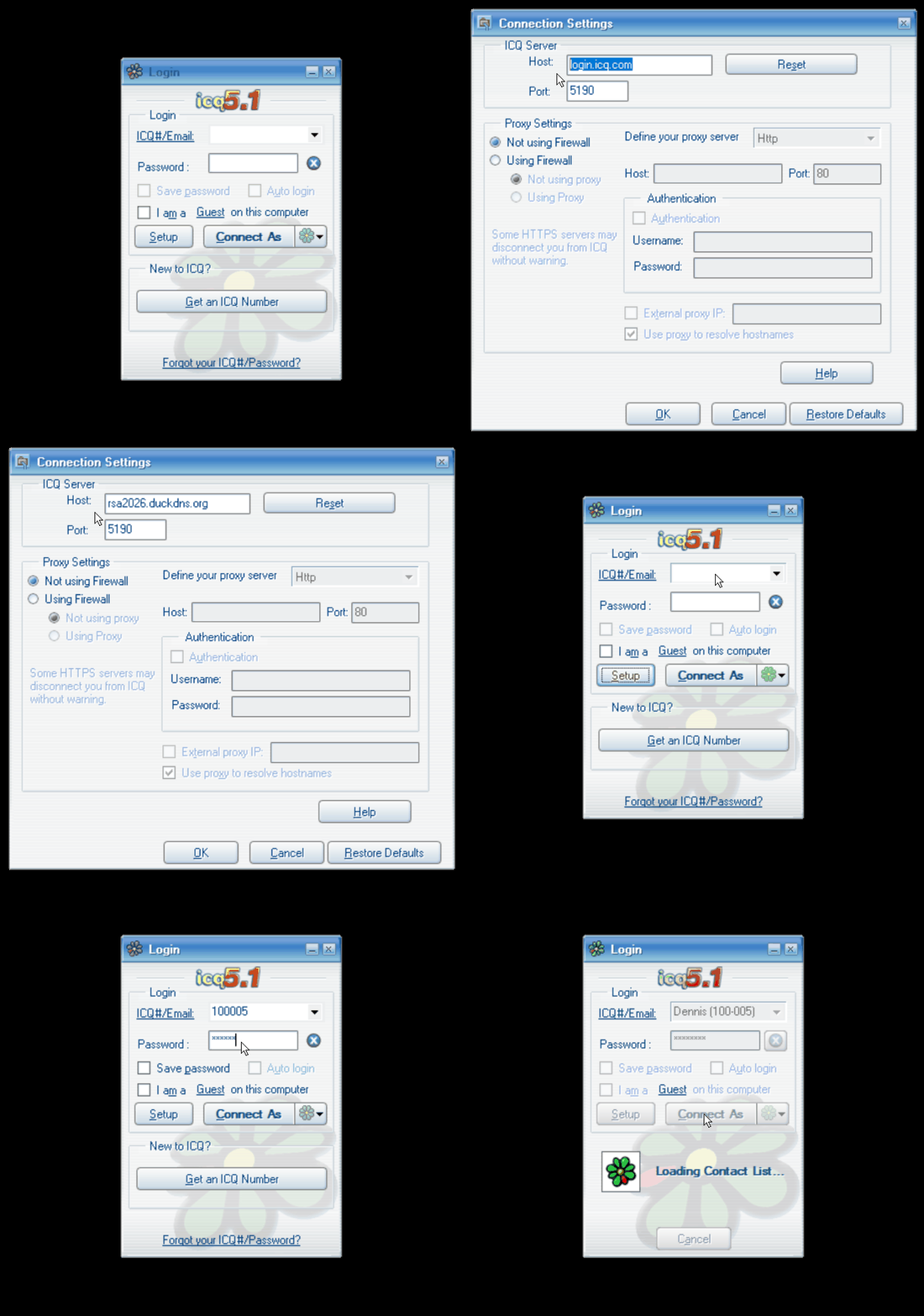
- Register your UIN: Fill out the registration form above and click the confirmation link sent to your email. You will receive your personal UIN (ICQ Number).
- Open Connection Settings: Launch your ICQ client and click the Setup button in the login window.
-
Change the Server Address: In the Connection Settings window under ICQ Server, replace the default host (
login.icq.com) with:Host:Click OK to save your settings.rsa2026.duckdns.org
Port:5190 - Sign In: Back on the login screen, enter your new UIN in the ICQ#/Email field and your Password, then click Connect As.
3. Setup for Older Versions (ICQ 98 – 2002)
-
ICQ 2001b & 2002a: Start the setup wizard as an Existing User and enter your UIN and password. Wait for the initial connection attempt to time out, then click Connection Settings and set Host to
rsa2026.duckdns.organd Port to5190. -
ICQ 2000b: Close the initial registration wizard after installation. Open the Windows Registry Editor (
regedit), navigate toHKEY_CURRENT_USER\Software\Mirabilis\ICQ\DefaultPrefs, and setDefault Server Hosttorsa2026.duckdns.org(andDefault Server Portto5190). Then launch ICQ and log in as an Existing User. -
ICQ 98a, 99a & 99b (Legacy UDP): In the registration wizard, click the For admin use button at the bottom. Enter Server
rsa2026.duckdns.organd Port4000(UDP), click OK, and sign in with your UIN and password.